Windows phone 8 C# code to check network or internet or wifi availablility
C# code in Windows phone 8 apps to display message in message box saying Network not available to update data when internet is not available in phone.
bool isNetwork = NetworkInterface.GetIsNetworkAvailable();
if (!isNetwork)
{
MessageBox.Show("Network not available to update data");
}
else {
//code to work when network is available
}

bool isNetwork = NetworkInterface.GetIsNetworkAvailable();
if (!isNetwork)
{
MessageBox.Show("Network not available to update data");
}
else {
//code to work when network is available
}

Tag :
Windows Phone apps
Privacy policy of Photo Viewer windows store app
Privacy policy of Photo Viewer windows store app
If you would like to report any violations of this policy, please contact us at sudhir.chekuri@tecminds.in

Photo Viewer is a windows store app that does not collect or publish any personal information.
Your privacy is our at-most concern.If you would like to report any violations of this policy, please contact us at sudhir.chekuri@tecminds.in
Tag :
PrivacyPolicy
Windows phone 8 Sqlite queries to insert update delete in C# xaml app
C# code in windows phone 8 app with sqlite commands
string dbPath = Path.Combine(Windows.Storage.ApplicationData.Current.LocalFolder.Path, "db.sqlite");
private void BtnUpdate_OnClick(object sender, RoutedEventArgs e)
{
using (var db = new SQLiteConnection(dbPath))
{
db.DeleteAll<RechargePlansData>();
db.RunInTransaction(() =>
{
for (int i = 0; i < d.l.Count; i++)
{
db.Insert(new RechargePlansData() { statename = 1, networkname = 1, categoryname = 1, amount = "2000", talktime = "2200", validity = "1 months", descriptiondata = "voda description1" });
}
});
}
private void BtnUpdate_OnClick(object sender, RoutedEventArgs e)
{
using (var db = new SQLiteConnection(dbPath))
{
var existing = db.Query<Person>("select * from Person").FirstOrDefault();
if (existing != null)
{
existing.FirstName = "Denis";
db.RunInTransaction(() =>
{
db.Update(existing);
});
}
}
}
private void BtnDelete_OnClick(object sender, RoutedEventArgs e)
{
using (var db = new SQLiteConnection(dbPath))
{
var existing = db.Query<Person>("select * from Person").FirstOrDefault();
if (existing != null)
{
db.RunInTransaction(() =>
{
db.Delete(existing);
});
}
}
}
C# code in RechargePlansData class
using System;
using System.Collections.Generic;
using System.Linq;
using System.Text;
using System.Threading.Tasks;
namespace WP8Sqlite
{
class RechargePlansData
{
[SQLite.PrimaryKey, SQLite.AutoIncrement]
public int Id { get; set; }
public int statename { get; set; }
public int networkname { get; set; }
public int categoryname { get; set; }
public string amount { get; set; }
public string talktime { get; set; }
public string validity { get; set; }
public string descriptiondata { get; set; }
}
}
Tag :
Windows Phone apps
Windows Phone 8 C# code to consume asmx webservice with ADO.NET code
I added web service in references of my windows phone 8 app.
DbakingsReference is the ServiceName i gave. This is used as namespace in C# code.
RechargePlansService is the class inside my webservice.
GetData is the web method i created in webservice which returns data in form of a user defined type named data.
//return type
DbakingsReference is the ServiceName i gave. This is used as namespace in C# code.
RechargePlansService is the class inside my webservice.
GetData is the web method i created in webservice which returns data in form of a user defined type named data.
Here is the code in web service asmx file containing web method that returns data which is retreived from sql server database using ADO.NET
using System.Web.Services;
using System.Configuration;
using System.Data.SqlClient;
using System.Data;
using System.Collections;
[WebService(Namespace = "http://tempuri.org/")]
[WebServiceBinding(ConformsTo = WsiProfiles.BasicProfile1_1)]
public class RechargePlansService : System.Web.Services.WebService {
public RechargePlansService () {
//Uncomment the following line if using designed components
//InitializeComponent();
}
SqlConnection con = new SqlConnection(ConfigurationManager.ConnectionStrings["sqlconnection"].ConnectionString);
[WebMethod]
public data GetData()
{
data d = new data(); ;
SqlCommand cmd = new SqlCommand("select * from tbl_data", con);
SqlDataAdapter da = new SqlDataAdapter(cmd);
DataSet ds = new DataSet();
da.Fill(ds);
int i = 0;
List<string> l1 = new List<string>();
for ( i = 0; i < ds.Tables[0].Rows.Count; i++)
{
l1.Add( ds.Tables[0].Rows[i][0].ToString() + "," + ds.Tables[0].Rows[i][1].ToString() );
}
d.l = l1;
return d;
}
//return type
public class data
{
public List<string> l;
}
}
Code in Windows phone app to display data retreived from web service in a message box
private void Btn1_Click(object sender, EventArgs e)
{
DbakingsReference.RechargePlansServiceSoapClient MyClient = new DbakingsReference.RechargePlansServiceSoapClient();
MyClient.GetDataCompleted += MyClient_GetDataCompleted;
MyClient.GetDataAsync();
}
private void MyClient_GetDataCompleted(object sender, DbakingsReference.GetDataCompletedEventArgs e)
{
DbakingsReference.data d= e.Result;
MessageBox.Show ( d.l[0]);
}
Tag :
Windows Phone apps
MVC 4 Part-2 Creating first MVC4 application
Step by Step demo to create MVC 4 application
File - New Project - Select C# - Web - ASP.NET MVC 4 Web Application

Project types - Empty contains nothing recommended for experts.
Basic contains some important MVC elements to use.
Internet application contains lot of required elements as default.
Select Basic to follow this example.
Select Razor as view engine to write razor code in the project.
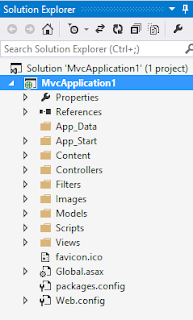
Solution Explorer with project files structure
Steps to add a controller
Right click on the controller folder and click on add - controller.
Enter controller name as FirstController.
Actually here First is the name of the controller.
Select empty API controller as template and click on Add.
Index.cshtml is the default view which is displayed when project is executed.
It is located in Home folder inside Views folder in solution explorer.
URL routing
The url routing is defined in RouteConfig.cs file which is present inside App_Start folder.
In that which url is mapped to which controller is defined.
url: "{controller}/{action}/{id}",
defaults: new { controller = "Home", action = "Index", id = UrlParameter.Optional }
This default router says that if there in no controller mentioned in the url then Home will be the default Controller and if there is no action mentioned in the url then Index will be the action performed.
File - New Project - Select C# - Web - ASP.NET MVC 4 Web Application

Project types - Empty contains nothing recommended for experts.
Basic contains some important MVC elements to use.
Internet application contains lot of required elements as default.
Select Basic to follow this example.
Select Razor as view engine to write razor code in the project.
Solution Explorer with project files structure

Controllers to hold controllers in the project. Models folder to add models of the project and views folder to add views for the project. Scripts folder is where javascript and jquery files are added.
Steps to add a controller
Right click on the controller folder and click on add - controller.
Enter controller name as FirstController.
Actually here First is the name of the controller.
Select empty API controller as template and click on Add.
Index.cshtml is the default view which is displayed when project is executed.
It is located in Home folder inside Views folder in solution explorer.
URL routing
The url routing is defined in RouteConfig.cs file which is present inside App_Start folder.
In that which url is mapped to which controller is defined.
url: "{controller}/{action}/{id}",
defaults: new { controller = "Home", action = "Index", id = UrlParameter.Optional }
This default router says that if there in no controller mentioned in the url then Home will be the default Controller and if there is no action mentioned in the url then Index will be the action performed.
Tag :
ASP.NET
MVC 4 Overview Part-1
MVC stands for Model View Controller.
MVC is built on ASP.NET. In ASP.NET we create websites using webpages or web forms.
Web Pages applications can be created using Web Matrix or Visual studio. They will have .CSHTML as extension. Javascript and C# razor syntax code can be added to it.
Web Forms applications can be created using Visual studio. They will have .aspx files and .aspx.cs files. UI is created using dragging controls. Double click to create events.
MVC applications contains models for data and objects. Views generate user interface. Controllers interact with user actions. Visual Studio is used to create this apps. Code in .cshtml and .cs files. Precise control of HTML and URLs.
Configuration, State management, Membership and roles, catching is also there in MVC.
You can also include Web forms inside MVC application because all of them are ASP.NET.
Life cycle
When a request comes Controller will receive the request then communicate with model to retreive data.
The retrieved data is send to View which represents data visually to user.
MVC is built on ASP.NET. In ASP.NET we create websites using webpages or web forms.
Web Pages applications can be created using Web Matrix or Visual studio. They will have .CSHTML as extension. Javascript and C# razor syntax code can be added to it.
Web Forms applications can be created using Visual studio. They will have .aspx files and .aspx.cs files. UI is created using dragging controls. Double click to create events.
MVC applications contains models for data and objects. Views generate user interface. Controllers interact with user actions. Visual Studio is used to create this apps. Code in .cshtml and .cs files. Precise control of HTML and URLs.
Configuration, State management, Membership and roles, catching is also there in MVC.
You can also include Web forms inside MVC application because all of them are ASP.NET.
Life cycle
When a request comes Controller will receive the request then communicate with model to retreive data.
The retrieved data is send to View which represents data visually to user.
Tag :
ASP.NET
Privacy policy of Flash Back windows store app
Privacy policy of Flash Back windows store app
If you would like to report any violations of this policy, please contact us at sudhir.chekuri@tecminds.in

Flash Back is a windows store app that does not collect or publish any personal information.
Your privacy is our at-most concern.If you would like to report any violations of this policy, please contact us at sudhir.chekuri@tecminds.in
Tag :
PrivacyPolicy